
Your Revit Template
in just 3 weeks
Not a generic file.
Not a half-finished standard.
A template that operationalizes your decisions and works from day one.
.svg)
What you get:
- Strategy Guidelines
You'll get a clear document that aligns your entire team on how your firm builds in Revit—before a single line is modeled. - Customization Catalog
A structured catalog that documents every key decision behind your template, from modeling rules to documentation logic—so nothing lives only in conversations. - Standards in Action - Cartoon Set
See how your projects will actually look when the template is applied. - Ready-to-use Revit Template
A user-friendly Revit file, preloaded with your essential elements. Built to be practical, intuitive, and immediately deployable across projects. - Access to Best Practices Notion Wiki
Lifetime access to a centralized knowledge base for onboarding, guidance, and long-term consistency.
Your Revit Template
in just 3 weeks
Not a generic file.
Not a half-finished standard.
A template that operationalizes your decisions and works from day one.
What you get:
- Ready-to-use Revit Template
A user-friendly revit file, preloaded with your essential elements. Built to be practical, intuitive, and immediately deployable across projects. - Internal Strategy Document
A concise document that defines how your firm builds in Revit—before a single line is modeled. Clear enough to align leadership and technical direction before anything is built. - Customization Catalog
A structured catalog that documents every key decision behind your template, from modeling rules to documentation logic—so nothing lives only in conversations. - Standards in Action - Cartoon Set
A visual walkthrough that shows what your standards look like in practice. Using a real project example, this set illustrates how plans, elevations, and views are documented—so anyone can understand the standard at a glance. - Access to Best Practices Notion Wiki
Lifetime access to a centralized knowledge base with clear guidance on how to use the template correctly. Designed to support onboarding, answer recurring questions, and keep usage consistent over time.
Is your Revit template messy?
Book a 3-week sprint with /slantis
This is exactly what you'll get 👇
1. One Pager Strategy
This document defines what your template is meant to do before you start. It turns years of BIM decisions into a clear, shared framework that aligns teams, speeds decisions, and creates a template people actually trust and adopt.

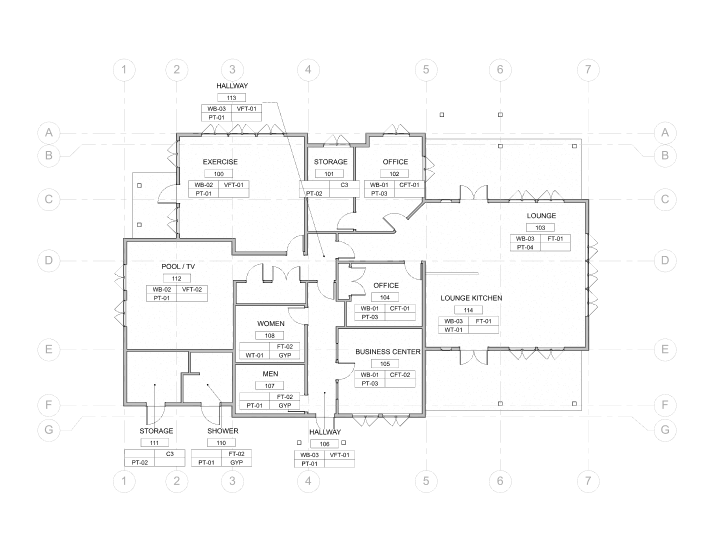
2. Cartoon Set
This deliverable shows exactly what your projects will look like. Using a sample architectural project, the Cartoon Set visualizes how plans, sections, elevations, and key views are documented, reflecting graphic standards tailored to your firm. Each element is intentionally selected and combined to define a clear, consistent end product.
3. Revit Template & User Guidelines
Ship projects faster with a ready-to-use Revit template and clear guidelines that teams actually follow—plus lifetime access to a knowledge base that supports onboarding and long-term consistency.
2. Cartoon Set
This deliverable shows exactly what your projects will look like.
Through a sample architectural project, you visualize how plans, sections, elevations, and key views are documented, reflecting graphic standards tailored to your firm.
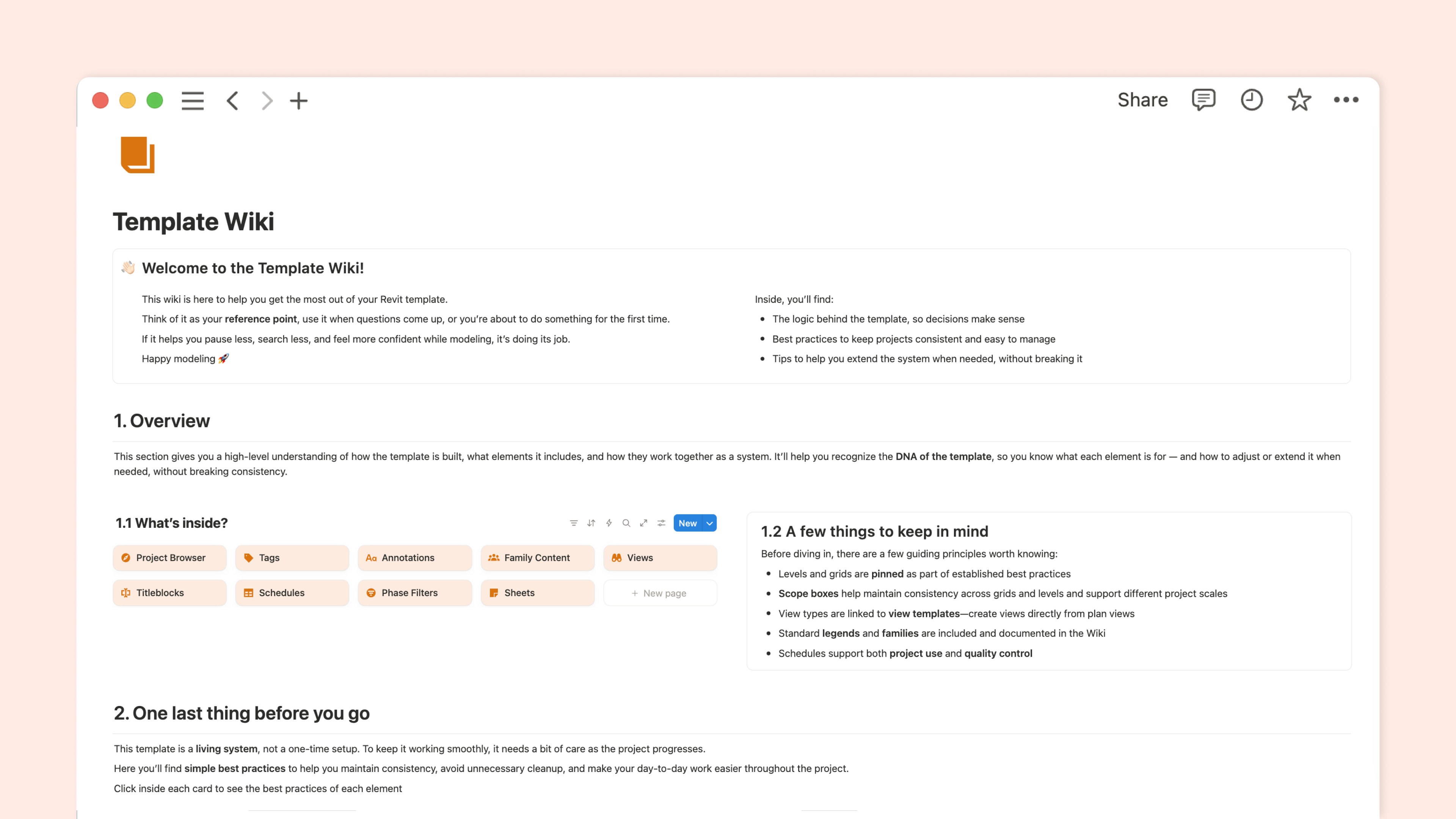
3. Revit Template & User Guidelines
Ship projects faster with a ready-to-use Revit template and clear guidelines that teams actually follow—plus lifetime access to a knowledge base that supports onboarding and long-term consistency.




Senior Associate at MJMA
Here’s exactly what the sprint looks like
Pre-work
Your Team
You complete a short intake designed to capture how your firm works today—your workflows, challenges, and goals. This helps us understand your context before any decisions are made, so the process is focused from the start.
Our Team
We review your input through the lens of 10+ years of template experience and use it to outline a clear strategic direction. Think of it as "the chef's selection", we curate a set of approaches we believe will work best for your team.
Week 1 | Strategy
Monday
Kick-Off Meeting
Set the rules of the game and lock in the strategic choices behind your template.
75 min
Tuesday
Internal Decision
Align internally and resolve all remaining decisions.
Wednesday 🕛
/slantis works on the Catalog Customizations
Thursday 🕛
/slantis works on the Catalog Customizations
Friday 🕛
/slantis works on the Catalog Customizations
You get a tailored Strategy One-pager ✅
Week 2 | Implementation
Monday
Customization Meeting
Focus on the non-catalog elements to be customized.
75 min
Tuesday
Internal Decision
You gather your team to answer all the customization pending questions
Wednesday 🕛
/slantis works on the non-catalog Customizations
Thursday 🕛
/slantis works on the non-catalog Customizations
Friday 🕛
/slantis works on the non-catalog Customizations
You get a Cartoon Set to see your Projects' look & feel ✅
Week 3 | Delivery 🎀
Monday
Walk-through Meeting
We go through the Revit File and Notion wiki together for review.
75 min
Tuesday
Final Feedback
Share your comments after the deliverables walkthrough.
Wednesday 🕛
/slantis works on the revisions
Thursday 🕛
/slantis works on the revisions
Friday ✉️
All deliverables ready to use right in your inbox!
You have a Full Revit Template and your team knows how to use it! ✅
FAQs
- the right balance between customization and affordability
- simple, clear workflows your team will actually use
- a low-maintenance system, not a one-off file
If you’re a design-oriented, forward-thinking firm looking for a template that matches where you are right now — this is likely a great fit 💘
A detailed breakdown of everything included is available during the 3-week sprint, where you can review the full scope before moving forward.